
Filter first
Narrow to Found, Not Found, the pages that could not be read, or only the rows that carry a link. Every count on screen is a filter you can press.
TOOL 02 · BACKLINK VERIFIER
Add your client’s domain and the pages where the links were placed. The Backlink Verifier opens every page and reports what is actually on it: which links are still there, the exact URL each one points to, the anchor text, and whether it is follow, nofollow, UGC or sponsored.
A page it could not read is reported as Unable to Verify, never as a missing link. That distinction is the point of the tool: it is what stops you telling a client a link was removed when it was not. It is the second of three WebDiagnosis tools, alongside the Backlink Prospect Checker.
500 free checks · No card · Sign in with Google
The Verifier checks the exact pages you give it. It does not discover backlinks, build links, or promise that a link helps rankings.
THE THREE ANSWERS
Most checkers give you two answers and quietly file everything they could not read under the second one. A blocked page and a removed link are not the same fact, and a client report that treats them the same is wrong in the direction that costs you money.
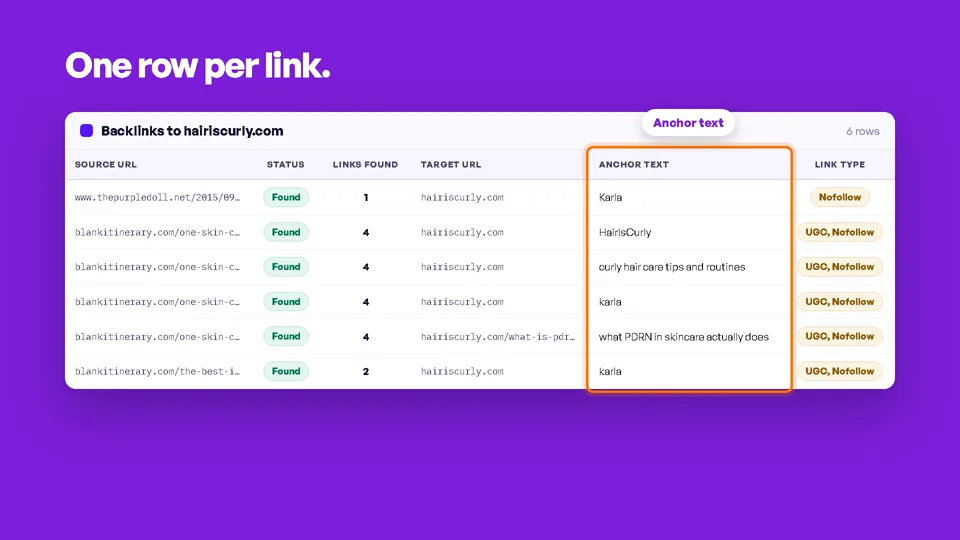
ONE ROW PER LINK
A page carrying four links to your client is four rows, each with its own target, anchor and link type — because that is how you check them. Rows stay in the order you added the pages, so the report pastes back beside the sheet it came from.
Run a checkINTO THE CLIENT’S SHEET
A report you have to re-type is a report you will not send. Filter to what matters, tick the rows, and copy.
Narrow to Found, Not Found, the pages that could not be read, or only the rows that carry a link. Every count on screen is a filter you can press.
A checkbox on every row, one in the header for everything the filter is showing, and shift-click to take a run of rows at once. Changing the filter keeps your selection, and tells you when part of it is out of view.
Copy the selected rows, or every row the filter is showing, straight to the clipboard for a paste into Sheets or Excel. Or export the whole report to Excel, CSV or Google Sheets.
HOW THE MATCH IS MADE
Worth knowing before you read a report, because it is where most checkers quietly disagree with each other.
See a sample reportFIT
Use it when you already hold the exact pages where links were placed. Finding links you did not build is a different job.
TWO TOOLS, ONE ACCOUNT
Both tools share one account and one credit balance. 500 credits on first use, no card, and nothing is ever posted on your behalf.
Before you build: which pages on your list can actually take a comment link, whether that link would be followed, the Ahrefs DR, and the spam risk.
Explore the checksAfter you build: which of those links are still on the page, where each one points, what it says, and what it carries. Live now.
Verify your backlinksPlanned. Scheduled re-checks of the same pages, reporting the links that disappeared, changed anchor or target, or turned nofollow since the last reading.
See the roadmapStart
Paste the list you already have and get back a shortlist you can run a campaign from. The free plan starts you with 500 credits, which is five full Quick Checks of 100 URLs before you decide anything.
Free plan · available now
Paid plans are not priced yet and allowances are undecided.