

When Google Search Console impressions rise but clicks stay flat, your site is appearing more often without gaining visits at the same pace. The extra visibility may come from useful new queries, weak positions, a different audience, an unsuitable ranking page or a search result that earns fewer clicks. The site-wide graph cannot tell you which explanation applies.
Start by finding the page and queries that produced the new impressions. Compare the same search context before changing a title or rewriting content. Once the page-query pair is isolated, the next step is usually clear.
The arithmetic is simple. Search Console calculates click-through rate as clicks divided by impressions. If clicks hold steady while impressions increase, CTR falls. That percentage describes the new traffic mix. It does not identify the cause.
What rising impressions and flat clicks actually mean
An impression means a link to your site appeared under Google’s counting rules for that result type. It does not show that the link was prominent, relevant to the searcher or likely to win a visit. Google’s click, impression and position definitions explain that data is generally assigned to the Google-selected canonical URL and that result types can be counted differently.
Current Search Console rules also cover links shown in AI Overviews and AI Mode. An external click counts as a click, while impressions and positions follow Google’s documented rules for those features. This can produce visibility that behaves differently from a familiar blue link. It still does not justify blaming every low-click query on AI. Inspect the affected search result before reaching that conclusion.
The high-impressions, low-clicks pattern becomes useful only after you separate the signals behind it. A relevant query moving from position 35 to 14 needs a different response from an established query holding near the top while clicks decline.
Find where the extra impressions came from
Open Search Console → Performance → Search results. Keep the search type consistent and compare two equal, completed periods. Weekly or monthly views reduce day-of-week noise. Avoid judging the newest dotted data because those figures can still change.
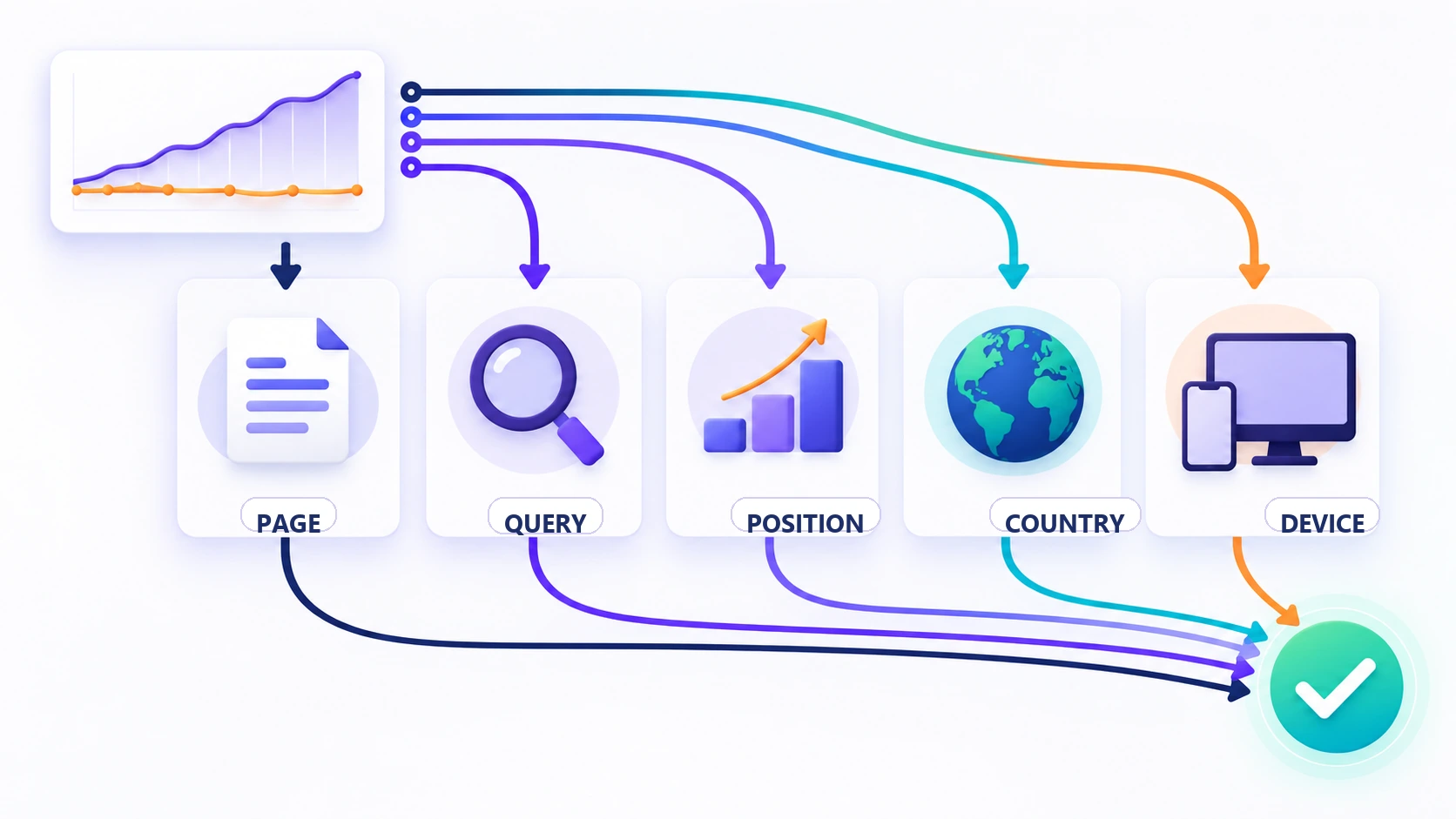
- Open Pages and sort by the impression difference. Find the URLs responsible for most of the increase. One new page can lower a site-wide CTR without changing the performance of established pages.
- Select one affected page, then open Queries. This reveals the searches that produced impressions for that URL instead of mixing unrelated pages together.
- Compare position in context. Look for query-level movement and the range of positions creating the impressions. A property-wide average can hide gains and losses that cancel each other out.
- Split the change by country and device. A mobile-heavy increase in a new market can lower the combined CTR while your main audience remains stable.
- Review Search appearance and the live result. A change in result type or surrounding search features can change the chance of a click even when the page still appears.
Use the Difference column instead of scanning two totals by eye. Google’s comparison guidance recommends equal periods and notes that weekly or monthly grouping can reduce day-of-week effects.
Expect some totals to change as you filter. Search Console calculates property-level and page-level data differently, and the query table can omit anonymized searches. Google’s Performance report data guide explains these aggregation rules. Treat the table as diagnostic evidence rather than a perfect ledger.
Match the pattern before choosing the fix
| What the filtered data shows | What it usually suggests | Useful next step |
|---|---|---|
| Relevant queries gained impressions at weak positions | The page is becoming visible before it is competitive enough to earn many clicks | Improve the answer, supporting evidence and useful internal context, then monitor the same queries |
| Important queries held similar strong positions while CTR fell | The search result may look less useful, or the results around it changed | Inspect the live title, snippet, result features and competing formats |
| Most new impressions came from unrelated queries | Google is testing or associating the page beyond its main purpose | Leave low-value exposure alone, or clarify the page if the mismatch persists |
| The increase came mainly from another country or device | The audience mix changed | Decide whether that segment matters, then review language, mobile presentation and intent |
| Two URLs appear for the same important query | Google may be alternating between overlapping pages | Choose one clear page owner and consolidate only when both URLs serve the same need |
| The page-query pair is stable and relevant, but clicks remain weak | The result may have a genuine click appeal problem | Test one honest title or content improvement and record the date |
If visibility is weak, improve the page before the snippet
When relevant queries gain impressions from weak positions, the page is visible but still has a ranking and usefulness problem. A title rewrite changes the presentation of the result. It does little when the result rarely reaches the part of the page where searchers choose it.
Open the query and study the leading results by the job they help a reader complete. Check whether your page:
- answers the main question near the beginning;
- provides the comparison, evidence or next step the current results lack;
- has one clear purpose rather than several loosely connected targets;
- uses a format that suits the decision, such as a checklist, worked example or table;
- receives useful internal links from pages where a reader would genuinely need it.
If the queries are adjacent to the page’s real subject, strengthen the existing answer. If they represent a separate decision with enough substance, a different page may deserve ownership. Irrelevant impressions can be left alone. A larger number does not create an obligation to chase it.
If CTR is genuinely weak, inspect the result people see
A CTR diagnosis becomes credible when you compare the same relevant query, page, country, device and approximate position. Search the query in the market that matters and read the result as a user would.
- Does the title state the problem or outcome in language the audience uses?
- Does Google show a different title link from the one you supplied?
- Does the visible snippet omit a limitation, date, price or distinction that affects the decision?
- Do videos, forums, shopping results, local results or AI features satisfy much of the need before a standard result earns attention?
- Does the landing page deliver what the title appears to promise?
Use a concise title that represents the visible page accurately. Google builds title links from several page and link signals, so changing the HTML title supplies an input rather than complete control. Its title-link guidance explains why another title may appear.
A meta description can communicate the useful distinction more clearly, although Google may generate a query-specific snippet from the page. Improve the answer near the top as well as the wrapper around it. A sharper promise attached to the wrong answer creates a faster disappointment.
Avoid universal “good CTR” targets. Click behavior changes with position, intent, brand familiarity, country, device and the shape of the result page. Your own comparable history for the same page-query pair is a more useful baseline than an industry average from another market.
Separate audience mix and the wrong ranking page
Country and device shifts often explain a property-wide CTR change. A page may gain mobile impressions where the result is pushed farther down the screen, or appear in a country where the offer, language or delivery area is a weak match. Decide whether the new audience is useful before optimizing for it.
Where available, Search Console’s branded and non-branded query filter can also separate people already looking for the business from broader discovery searches. Google’s Performance report tasks guide explains the filter and notes that it may be unavailable on low-impression properties and sub-properties.
Next, filter one important query and open the Pages tab. If two URLs appear, compare their purpose and performance. Strengthen the page that best satisfies the search. Combine pages only when they overlap in intent and neither has a distinct reader job. Creating another article for every query variation can turn one clear opportunity into three competing pages.
Make one measured change, or leave it alone
Wait and monitor when new impressions are recent, relevant and arriving alongside improving positions. Improve the page when the query fits but the answer or format falls short. Refine the title and opening when a stable, visible result does not communicate its value. Clarify page ownership when Google alternates between overlapping URLs.
Some impressions deserve no action. Wrong-country searches, unrelated wording and very weak positions can enlarge the denominator without creating a worthwhile click opportunity.
For changes you do make, record the affected page and query, the date, the evidence behind the decision and the metric you expect to move. Review a completed comparison period. Changing the title, body, internal links and technical setup together destroys the evidence needed for the next decision.
This follows the site’s publishing methodology: document what changed, what was measured and what the result cannot prove.
The practical rule is straightforward: identify the page that gained impressions, identify the queries behind the gain, compare the same search context, then fix the layer that failed. The title may need work. The page may need a stronger answer. The new visibility may simply be too early, too broad or too unrelated to deserve a change.