

The Search Console status Duplicate without user-selected canonical means Google grouped the reported URL with another duplicate or very similar page and chose a different URL as the representative canonical. The reported URL is excluded from Google’s index.
That is not automatically a problem. If Google selected the page you want people to find, the exclusion may be working exactly as it should. If Google chose the wrong page, adding a canonical tag without checking the relationship can hide the real cause.
The first question is not “How do I force this URL into Google?” It is: Which URL should represent this content, and why? If the URL is an external page containing your backlink rather than a page in your own Search Console property, use the separate backlink-not-indexed checklist.
Check the canonical pair before changing anything
Open the affected URL in Search Console’s URL Inspection tool and find two fields:
- User-declared canonical: the URL your page or other signals nominate, if any.
- Google-selected canonical: the URL Google currently treats as representative.
Google says the selected canonical is available in the indexed data, not predicted by the live test. The indexed result may also reflect an older crawl, so compare the last crawl date with any recent site changes.
Open both URLs as a visitor. Then answer three questions:
- Do they serve the same purpose?
- Should both remain accessible?
- Which one should appear in search results?
This comparison matters more than the status label. A tracking-parameter URL excluded in favor of the clean product URL is usually fine. A service page excluded in favor of an old tag archive is not.
Choose one of four outcomes
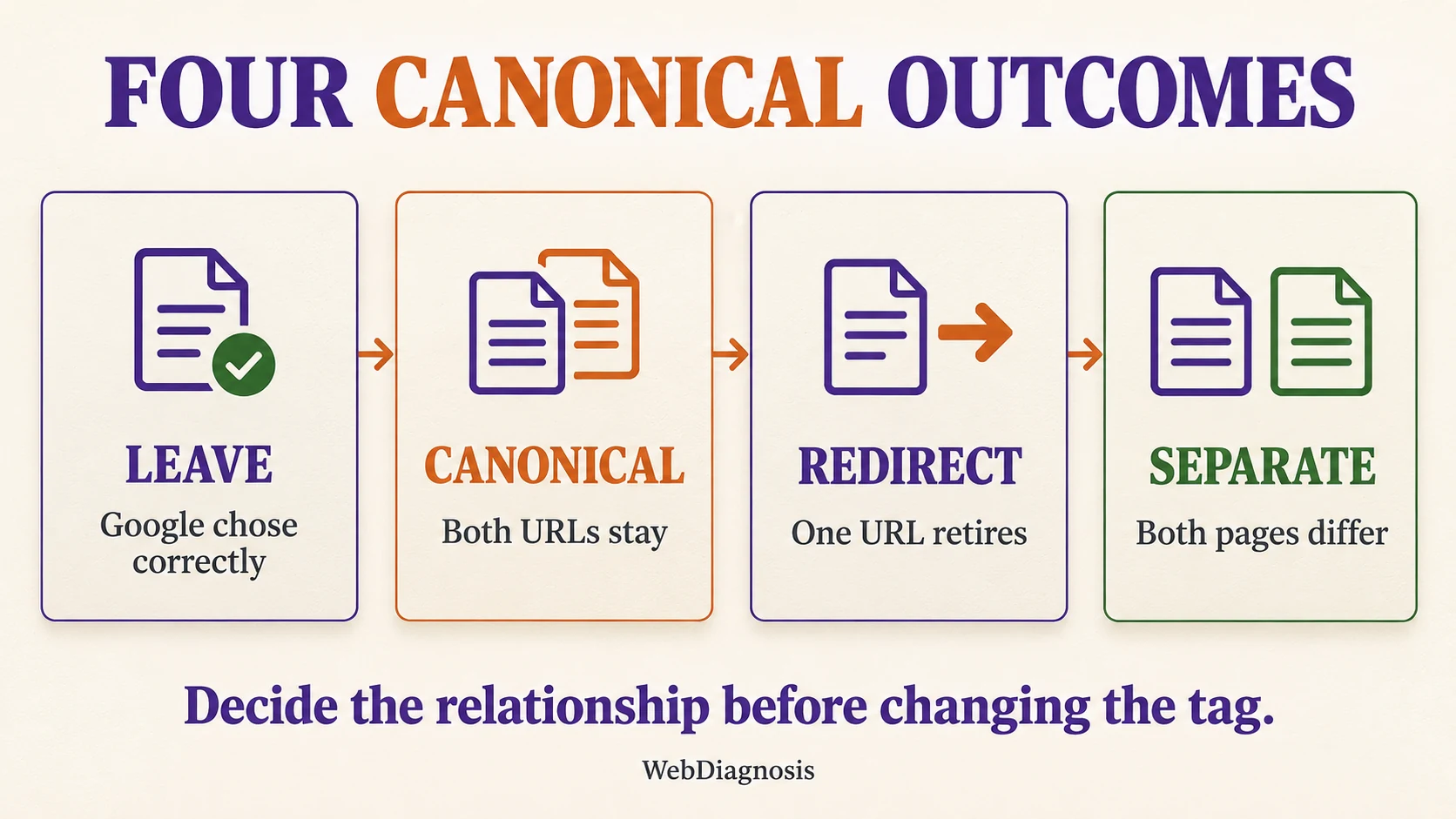
Leave it alone when Google chose correctly
No fix is needed when the reported URL is an expected duplicate and the Google-selected canonical is the page you prefer. Common examples include tracking parameters, sort orders and alternate paths that show the same content.
Still tidy the signals. Link internally to the preferred URL and include only that URL in your XML sitemap. If the duplicate must remain crawlable, a canonical declaration can make your preference clearer, but the excluded URL does not need to become indexed.
Do not judge success by forcing the number of excluded pages to zero. Large sites can have valid duplicate URLs. The useful outcome is that the correct page represents each duplicate set.
Use a canonical when both URLs must remain accessible
Use rel="canonical" when visitors need both URLs but the pages are the same or very similar and only one should appear in search.
For example, a filtered product view may need to load for users while the main category page remains the preferred search result. Point the duplicate to the preferred URL and add a self-referencing canonical on the preferred page. Use absolute URLs and keep the target crawlable and indexable.
A canonical is a strong signal, not a command. Google lists redirects and rel="canonical" as strong signals and sitemap inclusion as a weaker one. Support the preference by linking to the preferred URL and listing that version in the sitemap. Avoid conflicting signals such as canonicalizing to one URL while redirecting, linking or adding the sitemap entry to another. Google’s canonical URL guidance explains how these signals can reinforce each other.
Redirect when the duplicate has no separate job
Use a permanent redirect when the old or duplicate URL no longer needs to work as a separate page. This is usually clearer than keeping two interchangeable URLs live.
Typical cases include an old slug after a redesign, a retired HTTP or hostname version, and a page that has been replaced by a direct equivalent. Redirect to the closest relevant destination, then update internal links and sitemap entries so they point straight to the final URL.
Do not redirect unrelated pages to the homepage simply to remove an exclusion. If there is no genuine replacement and the content should be gone, return a proper 404 or 410 response instead. The site’s guide to fixing broken backlinks after a redesign explains why destination choice matters.
Separate the pages when both deserve indexing
If both URLs need to rank, they cannot remain near copies with different titles. Give each page a distinct purpose that is visible in the main content.
Clarify the audience, question and action for each page. Rewrite overlapping sections, use specific headings, add evidence or data unique to that page, and link to each URL from relevant internal pages. Each page should then use a self-referencing canonical.
Minor wording changes are rarely enough. Google notes that pages split from a duplicate cluster faster when their differences are clear and significant. If you cannot define a separate search purpose, consolidation is usually the cleaner choice.
Find why the duplicate URL exists
The status is an outcome, not the cause. Group affected URLs by pattern before editing them one by one.
- tracking, filtering, sorting or session parameters;
- HTTP and HTTPS, www and non-www, or mixed hostname versions;
- trailing-slash, uppercase or alternate-path variants;
- print pages, PDFs and downloadable copies;
- product variants with nearly identical descriptions;
- tag, category, author or search archives created by a CMS;
- staging, preview or test URLs reachable by crawlers;
- two articles written for the same reader decision.
A repeated parameter pattern points to a template or linking problem. Two editorial pages with the same purpose point to a content decision. Treating both as a missing-tag problem leads to fragile fixes.
Avoid fixes that create a second problem
Do not self-canonical every flagged URL. That tells Google each duplicate should be its own representative, even when the pages are interchangeable.
Do not canonicalize to an irrelevant or non-indexable page. The target should be the closest representative, return a successful response and remain available for indexing.
Do not block a duplicate in robots.txt before Google can read its canonical. Blocking the crawl can prevent Google from seeing the signal you added.
Do not use noindex merely to make Google choose another canonical. Use noindex when a page should remain accessible but should not appear in search. It solves a different decision.
Do not keep requesting indexing without changing the signals. A live test can confirm that Google can fetch a page, but Google says it does not predict duplicate or canonical selection. Repeated requests will not make two near-identical pages distinct.
Apply the fix by pattern, then verify it
Use a small sample before changing an entire template:
- Export the example URLs from the Page indexing report and group them by pattern.
- Inspect one important URL from each group and record the Google-selected canonical.
- Decide whether the pair needs no action, a canonical, a redirect or real separation.
- Apply the change to the page or template.
- Align internal links, sitemap entries and other canonical signals with the decision.
- Test representative URLs and check the rendered or returned canonical value.
- Request indexing for the most important changed URLs, then use Validate fix for the affected issue when appropriate.
Reprocessing is not instant. Google’s canonicalization troubleshooting guide says pages can remain in a duplicate cluster for up to two weeks after meaningful content changes. Watch the canonical pair, not only the issue count.
The right result may be an indexed preferred URL, an alternate page with a proper canonical, a redirected old URL, or two clearly distinct indexed pages. The goal is not to index every discovered URL. It is to make the intended page relationship unmistakable to users and search engines. If the correct URL is indexed but search visibility still underperforms, diagnose that separately from canonicalization, just as you would when impressions rise but clicks stay flat.