

A soft 404 means Google fetched a URL but decided the page looks missing or unusable even though the server did not return a normal 404 or 410 response. Google may have received a 200 OK, followed a redirect to an irrelevant page, or rendered an almost empty page.
The fix is not “request indexing again.” First decide what the URL is supposed to mean:
| What happened to the page? | Correct response | Avoid |
|---|---|---|
| Gone with no close replacement | Return 404 or 410 | Serving an error message with 200 |
| Moved or replaced | 301 redirect to the closest equivalent | Redirecting everything to the homepage |
| Still valid | Keep 200 and repair content or rendering | Adding filler or resubmitting an unchanged page |
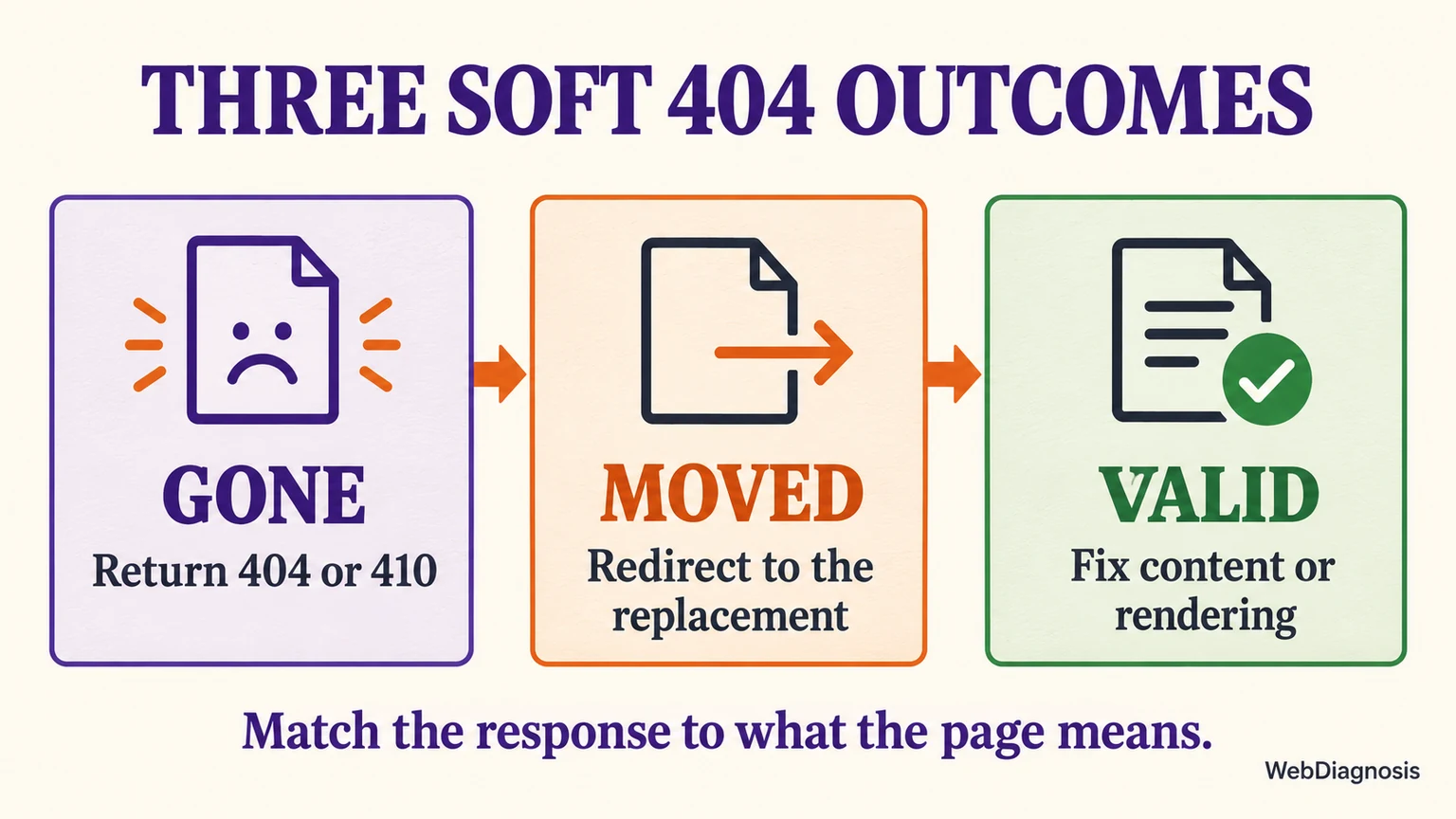
Google’s current crawling guidance uses the same three outcomes: no longer available, available somewhere else, or still available. That distinction protects useful URLs while letting genuinely removed pages leave the index cleanly.
A soft 404 is Google’s judgment, not a status code
There is no official HTTP status called “soft 404.” It is a Search Console classification based on the response and the page Google sees after rendering.
A true 404 is consistent: the server returns 404 Not Found, and the page can still show helpful navigation or related content to visitors. A soft 404 sends conflicting signals. The response says success, but the main content says “not found,” shows no results, fails to load, or looks like an empty template.
This is why checking the page in your own browser is not enough. Your browser may load cached resources, run scripts successfully or receive a different response from Googlebot. The useful evidence is the HTTP response plus Google’s rendered version.
Choose the outcome before you touch the page
The page is gone: return 404 or 410
Use 404 when the URL has no useful replacement and should no longer be indexed. Use 410 when you want the response to state explicitly that the resource is gone. For Google Search, both communicate that the URL should leave the index, so 404 is a perfectly valid default.
Keep the custom error page helpful, but keep the response honest. A branded page with navigation, search and suggested articles can still return 404. Do not return 200 simply because the error page has useful design or links.
Also remove the dead URL from XML sitemaps and update internal links that still point to it. Random typo URLs or obsolete URLs with no traffic, links or replacement do not need a redirect just to make an audit look clean.
The page moved: redirect to the closest replacement
Use a permanent 301 redirect when the old URL has a clear new home with the same purpose. Examples include a changed product URL, a renamed service page or an article moved during a redesign.
The destination must be genuinely relevant. Redirecting every deleted URL to the homepage or a broad category can itself be treated as a soft 404 because the destination does not satisfy the original request. If no close replacement exists, return 404 or 410 instead.
After adding the redirect, update internal links and sitemap entries to point directly to the final URL. This avoids unnecessary hops and makes the intended destination clear. The WebDiagnosis guide to broken backlinks after a redesign explains how to map old URLs to appropriate destinations rather than convenient ones.
The page is valid: fix what Google actually receives
If the page should remain in search, keep a successful response and investigate why Google saw an error-like result. Common causes include:
- main content that is blank or nearly blank after rendering;
- JavaScript, API or database failures that leave only the template;
- important resources blocked from Googlebot;
- an internal search or archive page with zero results;
- prominent “not available” wording with little evidence that the page still has a purpose;
- intermittent server errors or slow resources during Google’s crawl.
Do not assume that adding more paragraphs is the answer. If a product list failed to render, extra introductory text does not repair the product list. If the page is intentionally useful with little text, make sure its primary content, title and purpose are visible in the rendered HTML.
Diagnose the mismatch in the right order
Start with one representative URL from each affected pattern, not every example in the report.
- Confirm the intended outcome. Should the URL exist, redirect or disappear?
- Check the response. Follow the full redirect chain and record the final HTTP status. A page that looks like an error but returns 200 is the classic mismatch.
- Inspect Google’s version. In Search Console’s URL Inspection tool, run a live test and review the screenshot, rendered HTML and loading issues.
- Compare the main content. Check whether Google sees the same primary content, title and useful controls that a normal visitor sees.
- Trace the source of the URL. Find internal links, sitemap entries, templates or external links that keep exposing it.
- Fix the shared cause. If many examples follow one pattern, repair the routing, response template or rendering dependency instead of editing URLs individually.
An HTTP checker can confirm status codes and redirects, but it cannot tell you whether Google rendered an empty page. Search Console can show Google’s rendered result, but a successful live test does not prove that the indexed classification has already changed. You need both views.
Avoid the fixes that keep soft 404s alive
Do not redirect all missing URLs to the homepage. A redirect is useful only when the target replaces the original resource.
Do not use noindex as a substitute for a correct 404. A noindex tag can be appropriate for a page that intentionally remains available but should not appear in search. It is not the clean response for content that no longer exists.
Do not block the URL in robots.txt while diagnosing it. Blocking can prevent Google from seeing the response or page changes you need it to process.
Do not request indexing before the page changes. Resubmitting the same response and rendered content gives Google no new reason to classify it differently.
Do not treat every ordinary 404 as an SEO emergency. Google notes that unknown URLs can appear because of typos, old links or URLs discovered in scripts. A correct 404 with no important internal links is often the right final state.
If the URL belongs to another website and contains a backlink to you, it is not a soft-404 issue in your Search Console property. Use the separate backlink-not-indexed checklist for that situation.
Verify the outcome, not just the warning count
For a gone page, success is a 404 or 410 response, removal from sitemaps and no important internal links. For a moved page, success is one clean redirect to a relevant 200 page, with links and sitemaps updated. For a valid page, success is a stable 200 response with complete main content visible in Google’s rendered result.
Then use Validate fix in the Page indexing report when the affected examples share the repaired pattern. Google must recrawl and reprocess the URLs, so the report can lag behind the live change.
Do not judge the work by whether every excluded URL becomes indexed. Gone pages should stay out. Moved pages should consolidate into their replacements. Only valid pages should return to indexing consideration. If a valid page becomes indexed but earns impressions without clicks, diagnose its search-result relevance separately using the impressions-up, clicks-flat workflow.
The shortest accurate rule is simple: match the response to what the page means. That resolves the soft 404 without hiding a valid page or redirecting users somewhere they did not ask to go.