

Ahrefs, Semrush and Google Search Console can show different backlink counts because they do not crawl, store, group or refresh links in the same way. A backlink missing from one report is not proof that the placement is broken, that another tool is wrong or that Google ignored the link.
Start with the decision you are trying to make. If you want to know whether one promised backlink exists, open its exact source page. If you want to measure growth, use the same report, scope and filters over time. If you want Google’s reported view, use Search Console while accepting the limits of that report.
Trying to make all three totals match is usually a long afternoon with no prize at the end. The useful goal is to understand why they differ and whether the difference changes an action.
| What you need to decide | Best evidence to start with | Main limitation |
|---|---|---|
| Does one promised backlink exist? | The exact source page and link element | A live link does not reveal how Google values it |
| Is the backlink profile growing? | One third-party index used consistently | The trend describes that provider’s database |
| Which sites does Google report as linking? | Search Console Links report | Rows are grouped, deduplicated and limited |
| Did an important placement change? | A dated direct check or placement monitor | You must already know the source URL |
What each backlink report is actually measuring
Ahrefs and Semrush build private backlink indexes with their own crawlers. Each company decides which pages to revisit, what its crawler may access, how to handle JavaScript links, which canonical URL represents a page and how long to retain a link after it disappears.
Search Console is different. It reports links from Google’s data for a property you control, but it is not a live ledger of every placement. Google’s current Links report documentation says duplicate links are combined, pages on your site are grouped by canonical URL and interface tables are limited to 1,000 rows. Its exports provide up to 100,000 latest links and another sample of up to 100,000 links.
Those systems overlap, but none is a copy of another. Their totals should be labelled by provider, target scope, index or filter, and check date. A number without those details looks precise while describing very little.
Before comparing totals, normalize these five settings
Many dramatic backlink discrepancies shrink when the reports are placed on equal footing. Check these settings before blaming a crawler:
- Metric: Compare backlinks with backlinks or referring domains with referring domains. One domain can produce links from hundreds of pages.
- Target: Match the same domain, subdomain, path or exact URL. A domain report and a page report answer different questions.
- Link state: Separate active or live links from recent, lost and historical links.
- Filters: Check whether link attributes, platform types, languages, authority thresholds or “best link” settings hide rows.
- Date: Record when the placement went live and when each provider last saw the source page.
If one website creates a very large share of the total, compare backlinks with referring domains before doing anything else. A repeated footer or template link can turn one relationship into thousands of rows. The sitewide backlink diagnostic shows how to inspect that pattern without assuming it is automatically helpful or harmful.
Why a live backlink may not show up in Ahrefs
Ahrefs has to discover and recrawl the source page with AhrefsBot. If the site blocks that crawler through robots.txt, a server rule, bot protection or an IP restriction, Ahrefs cannot record the link even when an ordinary browser can open the page.
Its current explanation of how Ahrefs stores links also describes differences caused by JavaScript rendering, URL parameters, canonicalization and duplicate handling. Ahrefs separates live, recent and historical indexes, so changing the selected index can change the count without any new link being built or removed.
For a new placement, time matters. Ahrefs says discovery can take a few days to several weeks, depending on crawl priority, page strength, site size and recrawl frequency. That timeline describes Ahrefs’ crawler. It does not tell you when Google found the page.
Why Semrush can show another number
Semrush runs its own crawler and also has more than one backlink workflow. Its Backlinks tool is designed for researching profiles and competitors, while Backlink Audit is designed to examine a site’s own links. Even those two Semrush reports can disagree.
Semrush’s current comparison of Backlinks and Backlink Audit lists concrete reasons: Backlink Audit limits how many links it pulls from one referring domain, the products retain different historical windows, redirect handling differs and Backlink Audit can include data imported from Search Console or Majestic.
Before comparing Semrush with Ahrefs, make the Semrush view active-only if the Ahrefs view contains only live links. Then compare the referring-domain tables and inspect the domains causing the largest differences. Exact equality is still unlikely because the providers crawl and consolidate the web differently.
Why Search Console usually does not match either tool
Search Console groups source sites by root domain and target pages by Google’s selected canonical URL. It combines duplicate links from the same source to the same target after normalization. It may also report links found over time that have since been removed or now sit on missing pages, and the report does not tell you whether a link is marked nofollow.
That makes Search Console useful for seeing which sites and pages appear in Google’s reporting, but weak for confirming whether a particular placement is still live today. A link missing from the report does not prove Google never found it. A link present in the report does not prove it improves rankings.
Do not combine the Search Console total with an Ahrefs or Semrush total. The grouping and retention rules are different. Keep each source as its own measurement series.
Verify one important backlink before debating the totals
When a link matters because it was purchased, earned through outreach or promised in a report, verify the placement itself. The following sequence separates a reporting mismatch from an actual link problem.
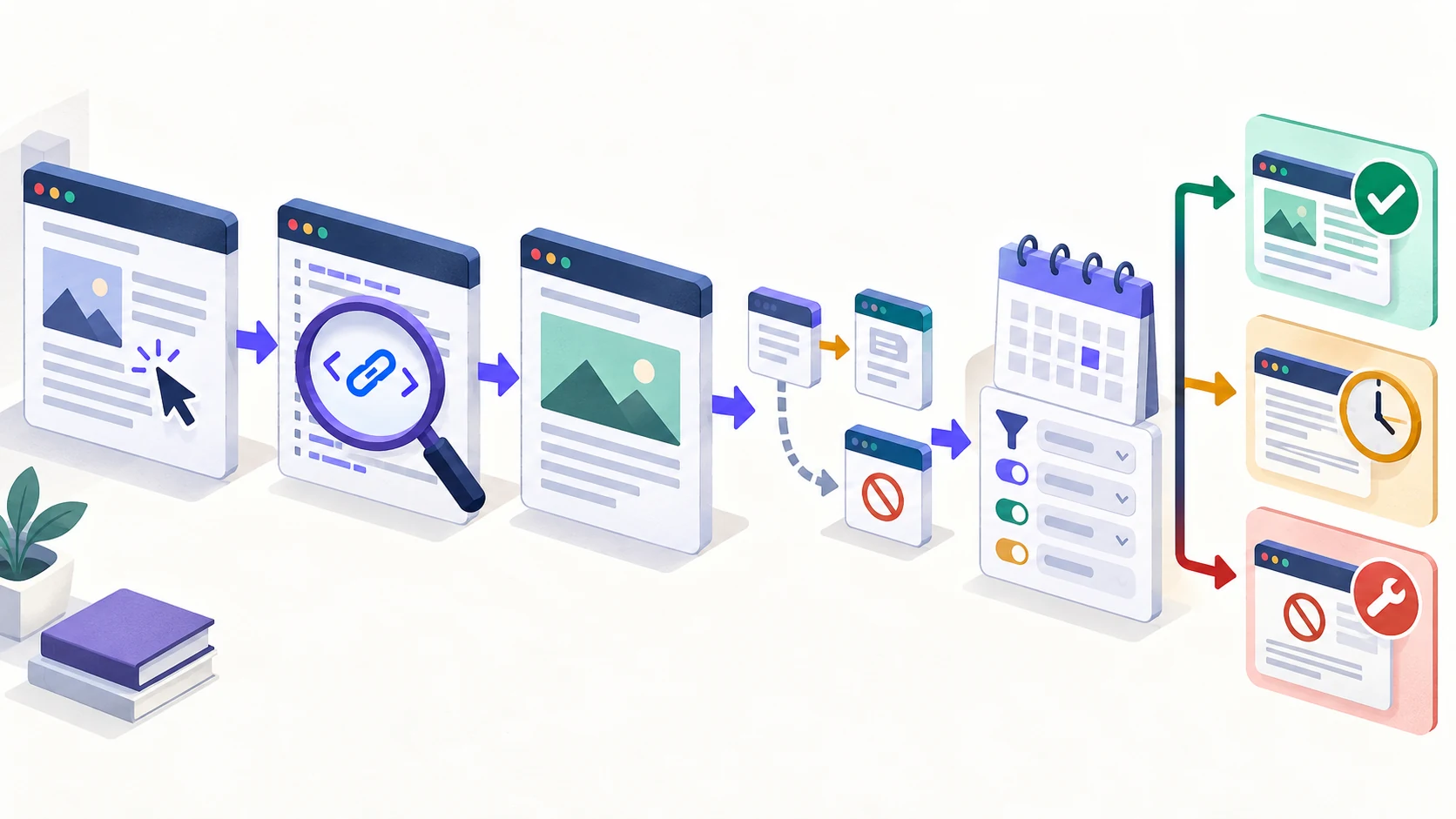
- Open the exact source URL. Record the status, final URL and whether the page is accessible without signing in.
- Find the actual link. Confirm the page contains a normal HTML
<a href>. Google’s crawlable-link guidance explains why script-only elements are unreliable substitutes. - Follow the destination. Check the final target after redirects and confirm it is the page you expected.
- Record the link attributes. Note
nofollow,ugcorsponsoredwithout treating one attribute as a complete quality judgement. - Check page signals. Review redirects, canonical URL,
noindexand crawler access. If the source page itself seems absent from search, use the separate backlink-indexing checklist. - Return to the report. Match the target scope, active or historical setting, filters and dates before calling the row missing.
If the link is present and reaches the correct page, you have a live placement even when one provider has not reported it. If it is removed, inaccessible or points somewhere unintended, you have a placement problem. The dashboard disagreement is secondary.
Which backlink count should go in a report?
Use one consistent provider for trend reporting and label it. A defensible report might say “Ahrefs live referring domains, domain scope, checked 24 September” rather than “the site has 214 backlinks.” The first statement can be repeated. The second quietly pretends every system agrees.
- For profile discovery: use Ahrefs or Semrush consistently and preserve the selected filters.
- For Google’s reported view: export Search Console data, keep its source label and do not present it as a current placement ledger.
- For delivered work: report the promised source URLs, destinations and verification dates. The link-building report checklist shows how to audit those rows.
- For ongoing changes: use a monitor or scheduled direct checks. Compare the monitoring workflows before expecting a discovery index to recheck every known placement quickly.
Keep raw totals separate from verified outcomes. Referring domains, new links and lost links are useful trends. A dated list of important placements tells you whether the work you care about is still there.
The practical answer
No backlink tool has the one true total. Each report is a view produced by its crawler, definitions, filters and refresh schedule. Search Console adds Google’s reporting, but its grouping, limits and historical rows make it unsuitable as a complete live-link register.
When backlinks are not showing up in Ahrefs, Semrush or GSC, first verify the source page and link. Then normalize the reports and check their dates. Act when the placement itself is missing, broken or changed. Record the mismatch when it belongs to the measurement system. That is less dramatic than chasing the largest dashboard number, and much more useful.